



In this blog post, I am going to discuss OSPF LSA flood pacing, an OSPF feature related to network convergence and scalability. Specifically, I am going to explain how LSA flood pacing helps get rid of CPU spikes and high network bandwidth utilization.
Note that OSPF supports other features that enhance network convergence such as OSPF LSA retransmission pacing, OSPF LSA group pacing, OSPF LSA throttling, OSPF SPF throttling, and OSPF incremental SPF.
In this post, I will be using this network topology. The OSPF router ID values of routers R1, R2, R3, and R4 are 1.1.1.1, 2.2.2.2, 3.3.3.3, and 4.4.4.4, respectively.

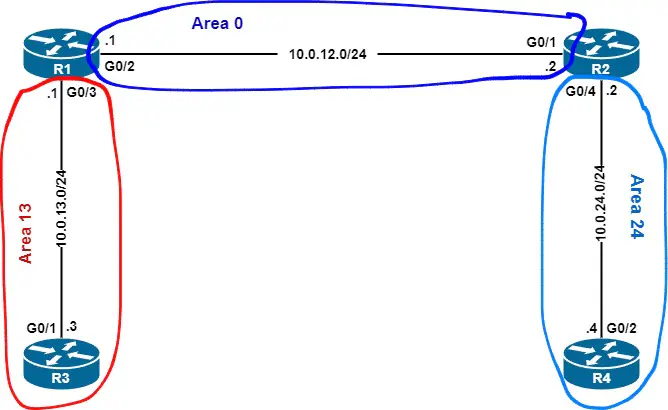
Here are the initial router configurations.
| Router R1 | Router R2 | Router R3 | Router R4 |
What is OSPF LSA Flood Pacing and How Does OSPF LSA Flood Pacing Work?
OSPF LSA flood pacing is a mechanism implemented in OSPF to regulate the frequency with which the router sends consecutive link-state update packets used to flood Link State Advertisements (LSAs) over an OSPF-enabled interface, regardless of whether the LSAs are self-originated or not. The LSA flood pacing feature involves all OSPF LSA types.


Figure 1 – Flooding LSAs individually
LSA flood pacing ensures that LSAs are not flooded individually. Sending each LSAs separately requires dedicating one LS Update packet to send each LSA (Figure 1).
In large routing domains, that would consume lots of bandwidth and generate CPU bursts because of the large number of LSAs exchanged between OSPF adjacent routers.
By implementing this feature, OSPF places LSAs eligible for flooding out of an interface in a list, and when the flood pacing timer expires, OSPF sends those LSAs out of the interface together with the needed LS update packets (Figure 2).


Figure 2 – Flooding LSAs per groups
Overall, this feature minimizes the network bandwidth and CPU cycles used by OSPF neighbors when exchanging LSAs.
OSPF LSA Flood Pacing Timer
The LSA flood pacing timer is an automatic mechanism used to flood LSA groups out of an OSPF-enabled interface at preset times after the corresponding LSAs have been added to the flooding list. By default, the LSA flood pacing timer is 33 milliseconds.
Optimizing and minimizing the volume of LSAs flooded between OSPF adjacent neighbors can be accomplished in different ways such as OSPF summarization, which helps reduce the number of LSAs exchanged between areas and external LSAs flooded through the OSPF autonomous system.
Moreover, implementing OSPF stub area types on one or many areas keeps the number of LSAs minimized, and thus routers consume a reduced amount of CPU cycles and bandwidth during the LSA flooding procedure.
It is not recommended to adjust the LSA flood pacing timer in order to optimize the OSPF LSA flooding process, and it should be a last resort option. However, since each OSPF routing domain is unique, changing that pacing timer may be a good option since it is easy to configure, unlike OSPF summarization and stub areas.
OSPF LSA Flood Pacing Configuration and Verification on Cisco IOS
On Cisco IOS 12.2(4) and above, the default OSPF LSA flood pacing timer is 33 milliseconds. To adjust this setting, use the timers pacing flood drtn command in router configuration mode, where drtn is a number between 5 milliseconds to 100 milliseconds.
This example sets the OSPF LSA flood pacing timer to 10 milliseconds on router R2.
R2(config)# router ospf 1
R2(config-router)# timers pacing flood 10
To check the LSA flood pacing timer, use the show ip ospf command in enable mode, as shown in this example.
R2# show ip ospf
Routing Process "ospf 1" with ID 2.2.2.2
Start time: 00:06:16.186, Time elapsed: 02:20:29.731
Supports only single TOS(TOS0) routes
Supports opaque LSA
Supports Link-local Signaling (LLS)
Supports area transit capability
Supports NSSA (compatible with RFC 3101)
Supports Database Exchange Summary List Optimization (RFC 5243)
Event-log enabled, Maximum number of events: 1000, Mode: cyclic
It is an area border router
Router is not originating router-LSAs with maximum metric
Initial SPF schedule delay 5000 msecs
Minimum hold time between two consecutive SPFs 10000 msecs
Maximum wait time between two consecutive SPFs 10000 msecs
Incremental-SPF disabled
Minimum LSA interval 5 secs
Minimum LSA arrival 1000 msecs
LSA group pacing timer 100 secs
Interface flood pacing timer 10 msecs
Retransmission pacing timer 66 msecs


omitted output
