



The OSPF NSSA area type is an area type that prohibits LSA types 4 and 5, while allowing redistribution of external routes using Type 7 LSAs, unlike stub and totally stubby areas. As a result, routers within an OSPF NSSA (not-so-stubby area) area accept only LSA Type 7-based external, inter-area, and intra-area routes. Only a limited set of LSA types are exchanged between routers: LSA Types 1, 2, 3, and 7.
OSPF NSSA areas can be useful if you need to separate or decrease the routing data sent throughout your network while maintaining ASBR support.
This tutorial describes Open Shortest Path First (OSPF) Not-so-stubby Area (NSSA) areas, how they work, and how to configure them.
In the rest of this lesson, we will use the following network topology (Figure 1).

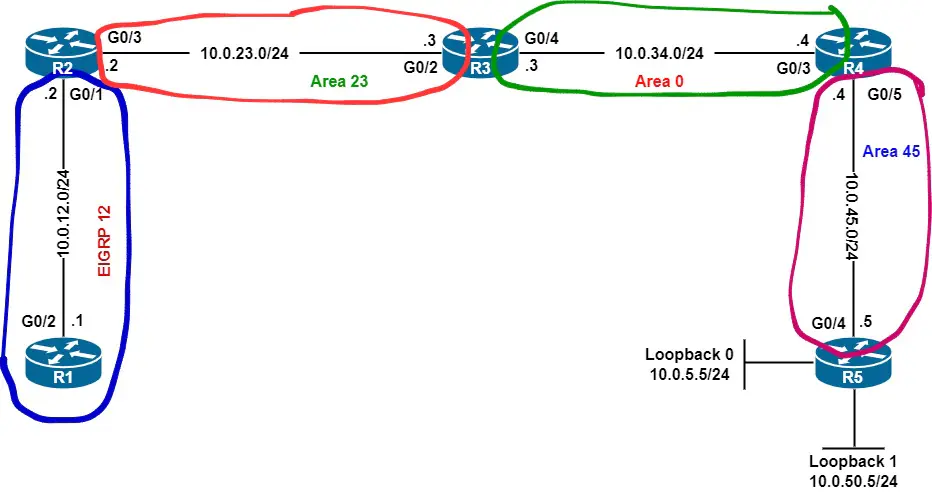
The routing domain has a total of five routers, one EIGRP routing domain, and four normal OSPF areas, including the backbone area. Here are the starting configurations of the routers.
| Router R1 | Router R2 | Router R3 | Router R4 | Router R5 |
Note that we redistributed R5’s loopback interfaces and EIGRP 12 routes into OSPF on routers R2 and R5.
How Does OSPF NSSA Area Work?
OSPF NSSA areas block ABRs from propagating ASBR summary LSAs (Type 4 LSAs), and external routes (Type 5 LSAs), into the area. Besides, stubby routers within an NSSA area cannot announce external networks using Type 5 LSAs.
ASBRs in an OSPF NSSA area exchange external networks via Type 7 LSAs. When an ABR receives a Type 7 LSA, it transforms the LSA into a Type 5 LSA.
OSPF NSSA areas deny LSA Types 4, and 5.
Let’s display router R2’s LSDB, which consists of area 23’s LSAs.
R2# show ip ospf database

            OSPF Router with ID (2.2.2.2) (Process ID 1)

                Router Link States (Area 23)

Link ID         ADV Router      Age         Seq#       Checksum Link count
2.2.2.2         2.2.2.2         10          0x8000000A 0x00329E 1
3.3.3.3         3.3.3.3         11          0x80000008 0x00F4D5 1

                Net Link States (Area 23)

Link ID         ADV Router      Age         Seq#       Checksum
10.0.23.3       3.3.3.3         11          0x80000001 0x007184

                Summary Net Link States (Area 23)

Link ID         ADV Router      Age         Seq#       Checksum
10.0.34.0       3.3.3.3         17          0x80000002 0x003DC5
10.0.45.0       3.3.3.3         17          0x80000002 0x00CD29

                Summary ASB Link States (Area 23)

Link ID         ADV Router      Age         Seq#       Checksum
5.5.5.5         3.3.3.3         17          0x80000001 0x004ECB

                Type-5 AS External Link States

Link ID         ADV Router      Age         Seq#       Checksum Tag
10.0.5.0        5.5.5.5         808         0x80000001 0x0097E5 0
10.0.12.0       2.2.2.2         113         0x80000001 0x00A4DD 0
10.0.50.0       5.5.5.5         808         0x80000001 0x00A6A9 0
The LSDB includes LSAs Type 1, 2, 3, 4, and 5.
We convert area 23 to an OSPF NSSA area using the area nssa command on routers R2 and R3. The area has one stubby router, which is R2.
The next show ip ospf database command output indicates that R2’s area 23 LSDB consists of router LSAs (Type 1 LSAs), network LSAs (Type 2 LSAs), summary LSAs (Type 3 LSAs), and Type-7 AS external LSAs. Area 23 no longer accepts sType 4 and Type 5 LSAs after becoming NSSA.
R2# show ip ospf database

            OSPF Router with ID (2.2.2.2) (Process ID 1)

                Router Link States (Area 23)

Link ID         ADV Router      Age         Seq#       Checksum Link count
2.2.2.2         2.2.2.2         48          0x80000005 0x00E1ED 1
3.3.3.3         3.3.3.3         49          0x80000005 0x00A61F 1

                Net Link States (Area 23)

Link ID         ADV Router      Age         Seq#       Checksum
10.0.23.3       3.3.3.3         49          0x80000003 0x0013DA

                Summary Net Link States (Area 23)

Link ID         ADV Router      Age         Seq#       Checksum
10.0.34.0       3.3.3.3         55          0x80000002 0x00E21A
10.0.45.0       3.3.3.3         55          0x80000002 0x00737D

                Type-7 AS External Link States (Area 23)

Link ID         ADV Router      Age         Seq#       Checksum Tag
10.0.12.0       2.2.2.2         69          0x80000001 0x00C68E 0
OSPF NSSA area allows route redistribution.
When compared to stub and totally stubby areas, OSPF NSSA areas permit stubby routers to propagate external routes into the area. For example, in the initial configuration of router R2, we redistribute EIGRP 12 into OSPF.
After transforming area 23 to an NSSA area, R2 still announces the EIGRP route into OSPF but this time using an LSA Type 7, as illustrated in the next show ip ospf database nssa-external command output.
R2# show ip ospf database nssa-external

            OSPF Router with ID (2.2.2.2) (Process ID 1)

                Type-7 AS External Link States (Area 23)

  LS age: 378
  Options: (No TOS-capability, Type 7/5 translation, DC, Upward)
  LS Type: AS External Link
  Link State ID: 10.0.12.0 (External Network Number )
  Advertising Router: 2.2.2.2
  LS Seq Number: 80000001
  Checksum: 0xC68E
  Length: 36
  Network Mask: /24
        Metric Type: 2 (Larger than any link state path)
        MTID: 0
        Metric: 20
        Forward Address: 10.0.23.2
        External Route Tag: 0
OSPF NSSA area’s ABRs change type 7 LSAs into type 5 LSAs in order to inject the area’s external routes into normal areas.
ABRs connected to OSPF NSSA areas advertise LSA Type 7-based routes into normal areas using Type 5 LSAs. For example, IP prefix 10.0.12.0 appears on the LSDBs of routers R4, and R5 with an LSA Type 5.
Router R4
R4# show ip ospf database external 10.0.12.0

            OSPF Router with ID (4.4.4.4) (Process ID 1)

                Type-5 AS External Link States

  LS age: 681
  Options: (No TOS-capability, DC, Upward)
  LS Type: AS External Link
  Link State ID: 10.0.12.0 (External Network Number )
  Advertising Router: 3.3.3.3
  LS Seq Number: 80000001
  Checksum: 0x3D1E
  Length: 36
  Network Mask: /24
        Metric Type: 2 (Larger than any link state path)
        MTID: 0
        Metric: 20
        Forward Address: 10.0.23.2
        External Route Tag: 0
Router R5
R5# show ip ospf database external 10.0.12.0

            OSPF Router with ID (5.5.5.5) (Process ID 1)

                Type-5 AS External Link States

  LS age: 697
  Options: (No TOS-capability, DC, Upward)
  LS Type: AS External Link
  Link State ID: 10.0.12.0 (External Network Number )
  Advertising Router: 3.3.3.3
  LS Seq Number: 80000001
  Checksum: 0x3D1E
  Length: 36
  Network Mask: /24
        Metric Type: 2 (Larger than any link state path)
        MTID: 0
        Metric: 20
        Forward Address: 10.0.23.2
        External Route Tag: 0
On router R3’s LSDB, the 10.0.12.0/24 network appears with both a type 7 LSA and a type 5 LSA since it is ABR in area 23, as you can see in the show ip ospf database command output.
R3# show ip ospf database


omitted output


                Type-7 AS External Link States (Area 23)

Link ID         ADV Router      Age         Seq#       Checksum Tag
10.0.12.0       2.2.2.2         922         0x80000001 0x00C68E 0

                Type-5 AS External Link States

Link ID         ADV Router      Age         Seq#       Checksum Tag
10.0.5.0        5.5.5.5         278         0x80000002 0x0095E6 0
10.0.12.0       3.3.3.3         900         0x80000001 0x003D1E 0
10.0.50.0       5.5.5.5         278         0x80000002 0x00A4AA 0
How to Configure an OSPF NSSA Area on Cisco IOS?
Configuring an OSPF NSSA area is a straightforward task. The area number nssa command allows setting up an NSSA area, where number is the identifier of the NSSA area. This IOS command can be used to prevent injecting redistributed routes by one or more ABR in the area, originate an OSPF default route using a Type 7 LSA, and limit the propagation of LSA Type 7-based redistributed routes outside the area.
Basic OSPF NSSA Area Configuration
This example converts area 23 to an NSSA area.
Router R2
R2(config)# router ospf 1
R2(config-router)# area 23 nssa
Router R3
R3(config)# router ospf 1
R3(config-router)# area 23 nssa
To verify our configuration, we first see that OSPF is considering the area as NSSA.
R2# show ip ospf
 Routing Process "ospf 1" with ID 2.2.2.2

 omitted output
 Reference bandwidth unit is 100 mbps
    Area 23
        Number of interfaces in this area is 1
        It is a NSSA area
        Area has no authentication
        SPF algorithm last executed 00:00:19.286 ago
        SPF algorithm executed 6 times
        Area ranges are
        Number of LSA 6. Checksum Sum 0x0338C3
        Number of opaque link LSA 0. Checksum Sum 0x000000
        Number of DCbitless LSA 0
        Number of indication LSA 0
        Number of DoNotAge LSA 0
        Flood list length 0
Second, we show the routing table of stubby router R2 to check that it does not get routes to subnets 10.0.5.0/24 and 10.0.50.0/24, which are redistributed by R5.
R2# show ip route


omitted output

      10.0.0.0/8 is variably subnetted, 6 subnets, 2 masks
C        10.0.12.0/24 is directly connected, GigabitEthernet0/1
L        10.0.12.2/32 is directly connected, GigabitEthernet0/1
C        10.0.23.0/24 is directly connected, GigabitEthernet0/3
L        10.0.23.2/32 is directly connected, GigabitEthernet0/3
O IA     10.0.34.0/24 [110/2] via 10.0.23.3, 01:23:14, GigabitEthernet0/3
O IA     10.0.45.0/24 [110/3] via 10.0.23.3, 01:23:14, GigabitEthernet0/3
Third, we display R2’s LSDB to check that the redistributed route from EIGRP is advertised using a type 7 LSA.
R2# show ip ospf database nssa-external

            OSPF Router with ID (2.2.2.2) (Process ID 1)

                Type-7 AS External Link States (Area 23)

  LS age: 1370
  Options: (No TOS-capability, Type 7/5 translation, DC, Upward)
  LS Type: AS External Link
  Link State ID: 10.0.12.0 (External Network Number )
  Advertising Router: 2.2.2.2
  LS Seq Number: 80000003
  Checksum: 0xC290
  Length: 36
  Network Mask: /24
        Metric Type: 2 (Larger than any link state path)
        MTID: 0
        Metric: 20
        Forward Address: 10.0.23.2
        External Route Tag: 0
Deny ABR from Redistributing Routes into an OSPF NSSA Area
Imagine you want to bring external routes into normal OSPF areas but not into an NSSA area. If the ASBR router is outside the area, we don’t have anything to do in order to accomplish this goal. This is because those routes would be sent to one of the area’s ABRs using Type 5 LSAs, so they cannot be advertised in the area.
If the redistributing router is one of the area’s ABRs, using the area number nssa no-redistribution command, where number is the identifier of the NSSA area, allows configuring an NSSA area and preventing a member router from advertising external routes.
In this example, we create a loopback interface with IP address 10.0.3.3/24 to router R3, redistribute the interface into OSPF, and deny OSPF from sharing subnet 10.0.3.0/24 with OSPF nodes in area 23, which is an NSSA area.
R3(config)# interface loopback 0
R3(config-if)# ip address 10.0.3.3 255.255.255.0
R3(config-if)# exit
R3(config)#
R3(config)# router ospf 1
R3(config-router)# redistribute connected subnets
R3(config-router)# area 23 nssa no-redistribution
R2 did not learn subnet 10.0.3.0/24, as indicated in the show ip route ospf command output below.
R2# show ip route ospf


omitted output

Gateway of last resort is 10.0.23.3 to network 0.0.0.0

O*IA  0.0.0.0/0 [110/2] via 10.0.23.3, 00:01:57, GigabitEthernet0/3
However, routers in area 0 and area 45 receive an LSA Type 5 generated by router R3 that advertises external subnet 10.0.3.0/24, as you can see in the following show ip route ospf command outputs.
Router R4
R4# show ip route ospf


omitted output

      10.0.0.0/8 is variably subnetted, 9 subnets, 2 masks
O E2     10.0.3.0/24 [110/20] via 10.0.34.3, 00:01:20, GigabitEthernet0/3
O E2     10.0.5.0/24 [110/20] via 10.0.45.5, 01:40:22, GigabitEthernet0/5
O E2     10.0.12.0/24 [110/20] via 10.0.34.3, 01:38:43, GigabitEthernet0/3
O IA     10.0.23.0/24 [110/2] via 10.0.34.3, 01:40:39, GigabitEthernet0/3
O E2     10.0.50.0/24 [110/20] via 10.0.45.5, 01:40:22, GigabitEthernet0/5
Router R5
R5# show ip route ospf


omitted output

      10.0.0.0/8 is variably subnetted, 10 subnets, 2 masks
O E2     10.0.3.0/24 [110/20] via 10.0.45.4, 00:02:25, GigabitEthernet0/4
O E2     10.0.12.0/24 [110/20] via 10.0.45.4, 01:39:49, GigabitEthernet0/4
O IA     10.0.23.0/24 [110/3] via 10.0.45.4, 01:41:28, GigabitEthernet0/4
O IA     10.0.34.0/24 [110/2] via 10.0.45.4, 01:41:28, GigabitEthernet0/4
Originating a Default Route at The Level of an ABR
The area number nssa default-information-originate command instructs Cisco IOS to generate and advertise an OSPF default route via a Type 7 LSA. The command is working on ABRs only.
The command may be useful if you want stubby routers to reach networks outside the OSPF routing domain while they still receive Type 3 LSAs from ABRs in the NSSA area.
Note that converting an NSSA area to a totally NSSA would result in generating and announcing a 0.0.0.0/0 route to the stubby routers, but would prevent Type 3 LSAs from entering the area.
This example configures ABR R3 to advertise a default route into area 23 via a Type 7 LSA.
R3(config)# router ospf 1
R3(config-router)# area  23 nssa default-information-originate
The show ip route ospf command indicates the default route is advertised successfully into area 23.
R2# show ip route ospf


omitted output

Gateway of last resort is 10.0.23.3 to network 0.0.0.0

O*N2  0.0.0.0/0 [110/1] via 10.0.23.3, 00:13:49, GigabitEthernet0/3
      10.0.0.0/8 is variably subnetted, 6 subnets, 2 masks
O IA     10.0.34.0/24 [110/2] via 10.0.23.3, 00:14:30, GigabitEthernet0/3
O IA     10.0.45.0/24 [110/3] via 10.0.23.3, 00:14:30, GigabitEthernet0/3
