


OSPF has various ways to detect routing traffic produced by unauthorized devices using the mechanism of authentication. OSPF allows configuring authentication on a per-area basis. However, if you want to enable authentication on an entire area except for a few links, OSPF Null authentication can be used to avoid authenticating OSPF exchanges on those links.
What is OSPF Null Authentication and How Does it Work?
OSPF supports three authentication types, including OSFP Null authentication, which is active by default. OSFP Null authentication means routers should not authenticate OSPF packets; unlike simple password and cryptographic authentication types, it is not an authentication method.
Generally, OSPF applies the authentication method attached to the sending interface once it constructs the current OSPF packet, and then sends it. This means OSPF does not typically authenticate routing exchanges based on area configuration.
When you enable Null authentication on a particular link, OSPF calculates the checksum of each OSPF packet using its entire content except the authentication data field, which can have any value in this case. Additionally, routers assign 0 to the Auth type field in the OSPF packets’ header (Exhibit 1) and ignore checking the authentication data field upon receiving routing packets.
Open Shortest Path First
    OSPF Header
        Version: 2
        Message Type: Hello Packet (1)
        Packet Length: 48
        Source OSPF Router: 10.0.0.1
        Area ID: 0.0.0.0 (Backbone)
        Checksum: 0xc494 [correct]
        Auth Type: Null (0)
        Auth Data (none): 0000000000000000
    OSPF Hello Packet
    OSPF LLS Data Block
Exhibit 1 – Example of an OSPF packet header when Null authentication is enabled
Configuring OSPF Null Authentication on Cisco IOS
You can activate OSPF Null authentication manually on a per-interface or virtual links basis only. In Figure 1, our OSPF autonomous system consists of areas 0, 1, and 2. In addition, we will configure a virtual link between R2 and R3 so that R3 becomes an ABR, and thus routers R1, R2, and R4 have full IP reachability to all subnets in the AS.

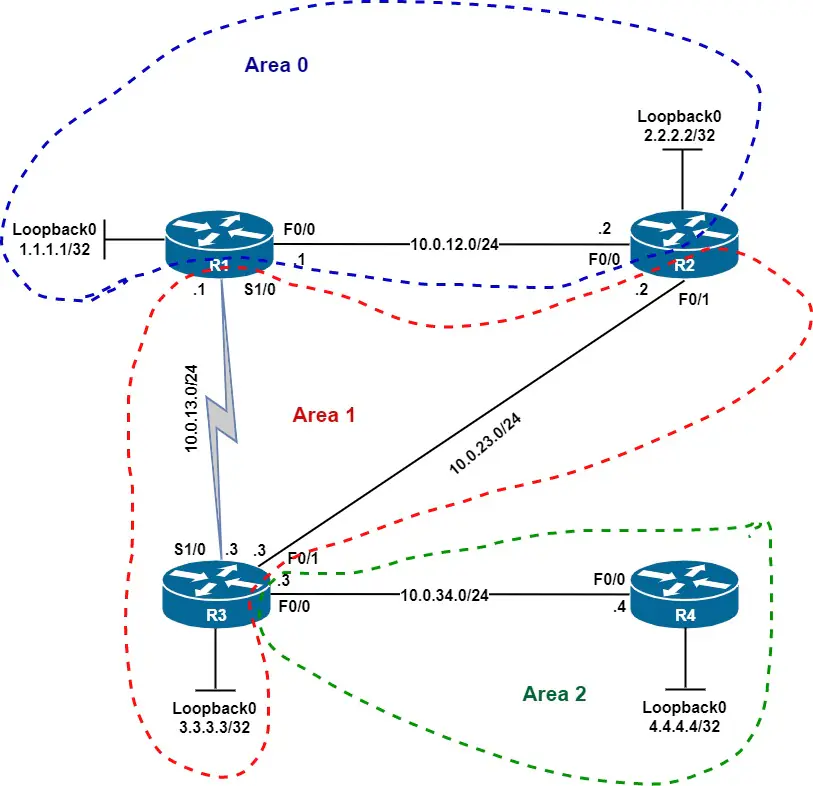
Figure 1 – Network diagram of an OSPF autonomous system
Here are the links to download the initial router configurations.
| Router R1 | Router R2 | Router R3 | Router R4 |
At this point, we enable OSPF simple password authentication in areas 0 and 1 using password cisco, except for the virtual link and subnet 10.0.23.0/24. To configure OSPF Null authentication, issue the ip ospf authentication null command in interface configuration mode, as you can see in the examples below.
Additionally, to set simple password authentication, use the area authentication and ip ospf authentication-key commands. Finally, note that there is no need to set up the authentication key on the loopback interfaces since they are connected to isolated networks.
Router R1
router ospf 1
area 0 authentication
area 1 authentication
!
interface fastethernet 0/0
ip ospf authentication-key cisco
!
interface serial 1/0
ip ospf authentication-key cisco
Router R2
router ospf 1
area 0 authentication
area 1 authentication
area 1 virtual-link 3.3.3.3 authentication null
!
interface fastethernet 0/0
ip ospf authentication-key cisco
!
interface fastethernet 0/1
ip ospf authentication null
Router R3
router ospf 1
area 0 authentication
area 1 authentication
area 1 virtual-link 2.2.2.2 authentication null
!
interface serial 1/0
ip ospf authentication-key cisco
!
interface fastethernet 0/1
ip ospf authentication null
When you enable a particular authentication type for area 0, OSPF applies it automatically to all virtual links. If you want to disable authentication on a virtual link, use the area arnmbr virtual-link rid authentication null command in router mode, where arnmbr is the ID of the transit area and rid is the router ID of the remote router.
Verifying OSPF Null Authentication in Cisco IOS
The show ip ospf interface FastEthernet 0/0 output (Exhibit 2) indicates that OSPF clear text authentication is enabled on F0/0. In contrast, the show ip ospf interface FastEthernet 0/1 output (Exhibit 3) does not include a line stating the current authentication type, meaning OSPF uses Null authentication on that interface.
R2# show ip ospf interface fastEthernet 0/0
FastEthernet0/0 is up, line protocol is up
  Internet Address 10.0.12.2/24, Area 0
  Process ID 1, Router ID 2.2.2.2, Network Type BROADCAST, Cost: 10
  Transmit Delay is 1 sec, State DR, Priority 1
  Designated Router (ID) 2.2.2.2, Interface address 10.0.12.2
  Backup Designated router (ID) 1.1.1.1, Interface address 10.0.12.1
  Timer intervals configured, Hello 10, Dead 40, Wait 40, Retransmit 5
    oob-resync timeout 40
    Hello due in 00:00:04
  Supports Link-local Signaling (LLS)
  Cisco NSF helper support enabled
  IETF NSF helper support enabled
  Index 2/2, flood queue length 0
  Next 0x0(0)/0x0(0)
  Last flood scan length is 1, maximum is 4
  Last flood scan time is 0 msec, maximum is 0 msec
  Neighbor Count is 1, Adjacent neighbor count is 1
    Adjacent with neighbor 1.1.1.1  (Backup Designated Router)
  Suppress hello for 0 neighbor(s)
  Simple password authentication enabled
Exhibit 2 – OSPF settings of R2’s F0/0 interface
R2# show ip ospf interface fastEthernet 0/1
FastEthernet0/1 is up, line protocol is up
  Internet Address 10.0.23.2/24, Area 1
  Process ID 1, Router ID 2.2.2.2, Network Type BROADCAST, Cost: 10
  Transmit Delay is 1 sec, State BDR, Priority 1
  Designated Router (ID) 3.3.3.3, Interface address 10.0.23.3
  Backup Designated router (ID) 2.2.2.2, Interface address 10.0.23.2
  Timer intervals configured, Hello 10, Dead 40, Wait 40, Retransmit 5
    oob-resync timeout 40
    Hello due in 00:00:03
  Supports Link-local Signaling (LLS)
  Cisco NSF helper support enabled
  IETF NSF helper support enabled
  Index 1/3, flood queue length 0
  Next 0x0(0)/0x0(0)
  Last flood scan length is 1, maximum is 2
  Last flood scan time is 0 msec, maximum is 0 msec
  Neighbor Count is 1, Adjacent neighbor count is 1
    Adjacent with neighbor 3.3.3.3  (Designated Router)
  Suppress hello for 0 neighbor(s)
Exhibit 3 – OSPF settings of R2’s F0/1 interface
Finally, to check that OSPF authentication is enabled on areas 0 and 1, issue the show ip ospf command in privileged EXEC mode, as you can see in the example below.
R1# show ip ospf
 Routing Process "ospf 1" with ID 1.1.1.1
 Start time: 00:01:54.576, Time elapsed: 00:48:30.060
 Supports only single TOS(TOS0) routes
 Supports opaque LSA
 Supports Link-local Signaling (LLS)
 Supports area transit capability
 It is an area border router
 Router is not originating router-LSAs with maximum metric
 Initial SPF schedule delay 5000 msecs
 Minimum hold time between two consecutive SPFs 10000 msecs
 Maximum wait time between two consecutive SPFs 10000 msecs
 Incremental-SPF disabled
 Minimum LSA interval 5 secs
 Minimum LSA arrival 1000 msecs
 LSA group pacing timer 240 secs
 Interface flood pacing timer 33 msecs
 Retransmission pacing timer 66 msecs
 Number of external LSA 0. Checksum Sum 0x000000
 Number of opaque AS LSA 0. Checksum Sum 0x000000
 Number of DCbitless external and opaque AS LSA 0
 Number of DoNotAge external and opaque AS LSA 0
 Number of areas in this router is 2. 2 normal 0 stub 0 nssa
 Number of areas transit capable is 1
 External flood list length 0
 IETF NSF helper support enabled
 Cisco NSF helper support enabled
    Area BACKBONE(0)
        Number of interfaces in this area is 2 (1 loopback)
        Area has simple password authentication
        SPF algorithm last executed 00:11:29.716 ago
        SPF algorithm executed 11 times
        Area ranges are
        Number of LSA 15. Checksum Sum 0x079282
        Number of opaque link LSA 0. Checksum Sum 0x000000
        Number of DCbitless LSA 0
        Number of indication LSA 0
        Number of DoNotAge LSA 6
        Flood list length 0
    Area 1
        Number of interfaces in this area is 1
        This area has transit capability
        Area has simple password authentication
        SPF algorithm last executed 00:12:03.876 ago
        SPF algorithm executed 5 times
        Area ranges are
        Number of LSA 14. Checksum Sum 0x07F7F8
        Number of opaque link LSA 0. Checksum Sum 0x000000
        Number of DCbitless LSA 0
        Number of indication LSA 0
        Number of DoNotAge LSA 0
        Flood list length 0
Exhibit 4 – OSPF settings on router R1
Authentication Types Other Than OSPF Null Authentication
OSPF Null authentication (Auth Type 0) is a way to tell routers not to authenticate routing exchanges over a particular link, network, or subnet. However, it may expose your network to severe threats, as long as the OSPF simple password authentication (Auth Type 1). Therefore, a cryptographic authentication method (Auth Type 2) is the safest way to protect routing traffic from being corrupted.
