



In an enterprise network, maintaining routers/switches is a common task. However, you may want router maintenance not to disrupt network users and applications. For example, restarting or replacing an OSPF-enabled router with a new one will cause IP packets (carrying voice, data,..) on some parts of the network to get dropped temporarily at certain nodes of the OSPF routing domain. Here comes the OSPF graceful shutdown feature to let you remove a router from the network with less interruption and faster network convergence.
In this lesson, you will learn what is OSPF graceful shutdown, how it works, and how to configure it on Cisco IOS. In the rest of this guide, I will be using the following network topology.

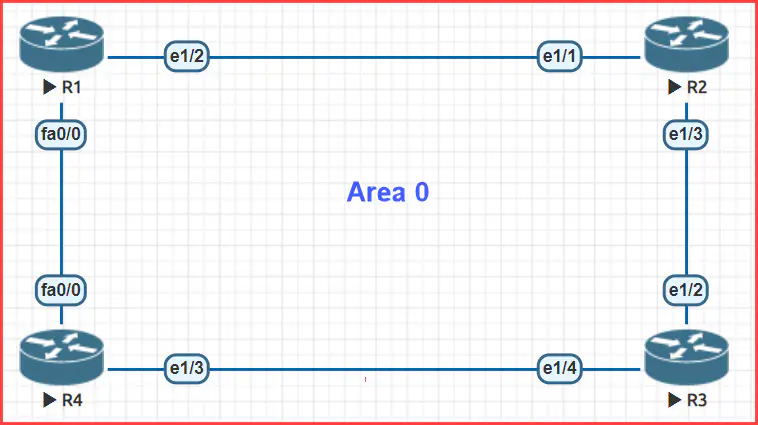
What is OSPF Graceful Shutdown?
OSPF graceful shutdown is a technique for taking an OSPF process or an OSPF-enabled interface out of service without causing too much disruption to route convergence and IP traffic on the network. In addition, traffic will not flow in both directions on the link to which each gracefully shut-down interface is connected.
In the next examples, we demonstrate how OSPF network convergence gets affected when we shut down a link using the shutdown command rather than initiating a graceful shutdown on it.
First, note that R1’s next hop to subnet 10.0.34.0/24 is router R4, as you can see in the next show ip route ospf command output.
R1# show ip route ospf


omitted output

      10.0.0.0/8 is variably subnetted, 6 subnets, 2 masks
O        10.0.23.0/24 [110/20] via 10.0.12.2, 00:00:10, Ethernet1/2
O        10.0.34.0/24 [110/11] via 10.0.14.4, 00:01:06, FastEthernet0/0
In the following example, we instructed router R1 to send 1000 ICMP echo requests to IP address 10.0.34.3 and then go to router R4 to disable the F0/0 interface. You can see how ICMP traffic between routers R1 and R3 gets affected when we shut down R4’s F0/0 interface using the shutdown command.
R1# ping 10.0.34.3 repeat 1000
Type escape sequence to abort.
Sending 100000, 100-byte ICMP Echos to 10.0.34.3, timeout is 2 seconds:
!!!!!!!!!!!!!!!!!!!!!!!!!!!!!!!!!!!!!!!!!!!!!!!!!!!!!!!!!!!!!!!!!!!!!!
!!!!!!!!!!!!!!!!!!!!!!!!!!!!!!!!!!!!!!!!!!!!!!!!!!!!!!!!!!!!!!!!!!!!!!
!!!!!!!!!!!!!!!!!!!!!!!!!!!!!!!!!!!!!!!!!!!!!!!!!!!!!!!!!!!!!!!!!!!!!!
!!!!!!!!!!!!!!!!!!!!!!!!!!!!!!!!!!!!!!!!!!!!!!!!!!!!!!!!!!!!!!!!!!!!!!
!!!!...!!!!!!!!!!!!!!!!!!!!!!!!!!!!!!!!!!!!!!!!!!!!!!!!!!!!!!!!!!!!!!!

omitted output
As you can see in the previous example, ICMP traffic got dropped for a few seconds, which was the time OSPF needed to find a new path to IP address 10.0.34.3.
At this point, we re-enable router R4’s F0/0 interface, configure router R1 to send 1000 ICMP echo requests to IP address 10.0.34.3 as shown below, and then go to router R4 to initiate gracefully shutdown on the F0/0 interface.
R1# ping 10.0.34.3 repeat 1000
Type escape sequence to abort.
Sending 1000, 100-byte ICMP Echos to 10.0.34.3, timeout is 2 seconds:
!!!!!!!!!!!!!!!!!!!!!!!!!!!!!!!!!!!!!!!!!!!!!!!!!!!!!!!!!!!!!!!!!!!!!!
!!!!!!!!!!!!!!!!!!!!!!!!!!!!!!!!!!!!!!!!!!!!!!!!!!!!!!!!!!!!!!!!!!!!!!
!!!!!!!!!!!!!!!!!!!!!!!!!!!!!!!!!!!!!!!!!!!!!!!!!!!!!!!!!!!!!!!!!!!!!!
!!!!!!!!!!!!!!!!!!!!!!!!!!!!!!!!!!!!!!!!!!!!!!!!!!!!!!!!!!!!!!!!!!!!!!
!!!!!!!!!!!!!!!!!!!!!!!!!!!!!!!!!!!!!!!!!!!!!!!!!!!!!!!!!!!!!!!!!!!!!!
!!!!!!!!!!!!!!!!!!!!!!!!!!!!!!!!!!!!!!!!!!!!!!!!!!!!!!!!!!!!!!!!!!!!!!
!!!!!!!!!!!!!!!!!!!!!!!!!!!!!!!!!!!!!!!!!!!!!!!!!!!!!!!!!!!!!!!!!!!!!!
!!!!!!!!!!!!!!!!!!!!!!!!!!!!!!!!!!!!!!!!!!!!!!!!!!!!!!!!!!!!!!!!!!!!!!
!!!!!!!!!!!!!!!!!!!!!!!!!!!!!!!!!!!!!!!!!!!!!!!!!!!!!!!!!!!!!!!!!!!!!!
!!!!!!!!!!!!!!!!!!!!!!!!!!!!!!!!!!!!!!!!!!!!!!!!!!!!!!!!!!!!!!!!!!!!!!
!!!!!!!!!!!!!!!!!!!!!!!!!!!!!!!!!!!!!!!!!!!!!!!!!!!!!!!!!!!!!!!!!!!!!!
!!!!!!!!!!!!!!!!!!!!!!!!!!!!!!!!!!!!!!!!!!!!!!!!!!!!!!!!!!!!!!!!!!!!!!
!!!!!!!!!!!!!!!!!!!!!!!!!!!!!!!!!!!!!!!!!!!!!!!!!!!!!!!!!!!!!!!!!!!!!!
!!!!!!!!!!!!!!!!!!!!!!!!!!!!!!!!!!!!!!!!!!!!!!!!!!!!!!!!!!!!!!!!!!!!!!
!!!!!!!!!!!!!!!!!!!!
Success rate is 100 percent (1000/1000), round-trip min/avg/max = 20/32/56 ms
R1#
This time ICMP traffic did not get interrupted even though the OSPF adjacency between R1 and R4 got dropped as you can see this example.
R4#
*Nov 15 16:41:50.859: %OSPF-5-ADJCHG: Process 1, Nbr 1.1.1.1 on FastEthernet0/0 from FULL to DOWN, Neighbor Down: Interface down or detached
How does OSPF Graceful Shutdown Work?
When you enable the OSPF graceful shutdown feature on a particular interface,
- The DR, BDR, and neighbor fields in the hello packets sent to OSPF adjacent neighbors are set 0.0.0.0.

- OSPF adjacent routers discovered over the interface are invited to exit the current state and get back to the INIT state.
- Interface-dependent LSAs are flooded with an age of 3600 seconds.

- All full OSPF neighbor relationships get discarded.
- The interface is no longer used to send or receive OSPF traffic.
- The interface is no longer used to route IP packets within the current OSPF routing domain.


When you enable the OSPF graceful shutdown feature on a particular OSPF instance,
- The DR, BDR, and neighbor fields in the hello packets sent to all OSPF adjacent neighbors are set to 0.0.0.0.
- OSPF adjacent routers are invited to exit the current state and get back to the INIT state.
- Router-dependent LSAs are flooded with an age of 3600 seconds.
- All full OSPF neighbor relationships get discarded.
- The router no longer sends or receives OSPF traffic.
- The router no longer routes IP packets within the current OSPF routing domain.
OSPF Graceful Shutdown Configuration on Cisco IOS
Cisco IOS allows you to configure this feature on a per-interface or per-OSPF process basis. To initiate graceful shutdown on a particular OSPF-enabled interface, use the ip ospf shutdown command.
This example enables OSPF graceful shutdown on router R4’s F0/0 interface.
R4(config)# interface FastEthernet 0/0
R4(config-if)# ip ospf shutdown
The next show ip route ospf command outputs state that routers R1 and R3 no longer use router R4 to reach subnets 10.0.34.0/24 and 10.0.14.0/24, respectively.
Router R1
R1# show ip route ospf


omitted output

      10.0.0.0/8 is variably subnetted, 6 subnets, 2 masks
O        10.0.23.0/24 [110/20] via 10.0.12.2, 00:22:51, Ethernet1/2
O        10.0.34.0/24 [110/30] via 10.0.12.2, 00:02:29, Ethernet1/2
Router R3
R3# show ip route ospf


omitted output

      10.0.0.0/8 is variably subnetted, 6 subnets, 2 masks
O        10.0.12.0/24 [110/20] via 10.0.23.2, 00:24:02, Ethernet1/2
O        10.0.14.0/24 [110/21] via 10.0.23.2, 00:03:40, Ethernet1/2
Note that OSPF is still configured on the interface but the corresponding routing process is not active on it, as shown in the following show ip ospf interface command output.
R4# show ip ospf interface fastEthernet 0/0
FastEthernet0/0 is up, line protocol is up
  Internet Address 10.0.14.4/24, Area 0, Attached via Network Statement
  OSPF Routing Process is shutdown
  Process ID 1, Router ID 4.4.4.4, Network Type BROADCAST, Cost: 1
  Topology-MTID    Cost    Disabled    Shutdown      Topology Name
        0           1         no          no            Base
  Transmit Delay is 1 sec, State DOWN, Priority 1
  No designated router on this network
  No backup designated router on this network
  Timer intervals configured, Hello 10, Dead 40, Wait 40, Retransmit 5
    oob-resync timeout 40
To re-enable the OSPF protocol on an interface, use the no ip ospf shutdown command. Besides, the ip ospf shutdown disable command allows disabling OSPF graceful shutdown for a virtual network. The disable keyword can be shown only in virtual network interface configuration mode.
Cisco IOS lets initiating OSPF graceful shutdown per-OSPF instance using the shutdown command in router configuration mode. The shutdown command deactivates OSPF in the least disruptive way while notifying neighbors of the current change in order to reroute IP prefixes served by the current router to alternate next hops.
This example disables OSPF process 1 gracefully.
R3(config)# router ospf 1
R3(config-router)# shutdown
The ip ospf command output below indicates that OSPF is still configured under instance 1 but it is not performing.
R3# show ip ospf
 Routing Process "ospf 1" with ID 3.3.3.3
 Start time: 00:02:13.124, Time elapsed: 11:10:55.796
 Routing Process is shutdown
 Supports only single TOS(TOS0) routes
 Supports opaque LSA
 Supports Link-local Signaling (LLS)
 Supports area transit capability
 Supports NSSA (compatible with RFC 3101)
 Event-log enabled, Maximum number of events: 1000, Mode: cyclic
 Router is not originating router-LSAs with maximum metric
 Initial SPF schedule delay 5000 msecs
 Minimum hold time between two consecutive SPFs 10000 msecs
 Maximum wait time between two consecutive SPFs 10000 msecs
 Incremental-SPF disabled
 Minimum LSA interval 5 secs
 Minimum LSA arrival 1000 msecs
 LSA group pacing timer 240 secs
 Interface flood pacing timer 33 msecs
 Retransmission pacing timer 66 msecs
 Number of external LSA 0. Checksum Sum 0x000000
 Number of opaque AS LSA 0. Checksum Sum 0x000000
 Number of DCbitless external and opaque AS LSA 0
 Number of DoNotAge external and opaque AS LSA 0
 Number of areas in this router is 2. 2 normal 0 stub 0 nssa
 Number of areas transit capable is 0
 External flood list length 0
 IETF NSF helper support enabled
 Cisco NSF helper support enabled
 Reference bandwidth unit is 100 mbps
    Area BACKBONE(0) (Inactive)
        Number of interfaces in this area is 1
        Area has no authentication
        SPF algorithm last executed 00:09:07.324 ago
        SPF algorithm executed 0 times
        Area ranges are
        Number of LSA 0. Checksum Sum 0x000000
        Number of opaque link LSA 0. Checksum Sum 0x000000
        Number of DCbitless LSA 0
        Number of indication LSA 0
        Number of DoNotAge LSA 0
        Flood list length 0
