



The OSPF point-to-point network type is commonly used on links supporting only two routers and on point-to-multipoint network topologies. This guide explains what OSPF point-to-point network type is, how it works, how to configure and verify that OSPF network type on Cisco IOS, and how OSPF represents point-to-point links in router LSAs
Here is the network topology I will be using in this tutorial.

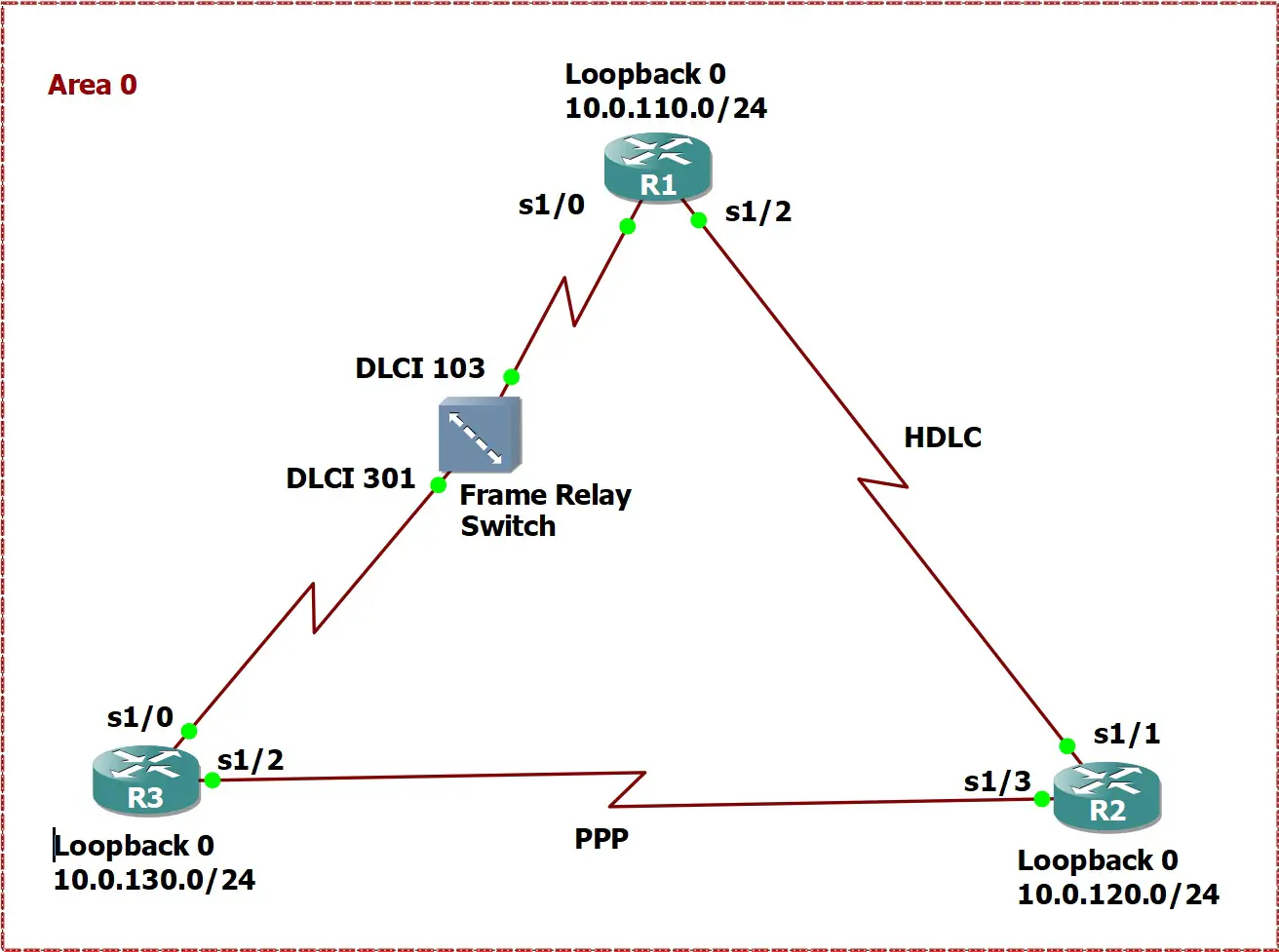
The following table list the IP addresses configured on the routers.
| Router | Interface | IP Address |
| R1 | Serial 1/2 | 10.0.12.1/24 |
| Serial 1/0.1 | 10.0.13.1/24 | |
| Loopback0 | 10.0.110.1/24 | |
| R2 | Serial 1/1 | 10.0.12.2/24 |
| Serial 1/3 | 10.0.23.2/24 | |
| Loopback0 | 10.0.120.2/24 | |
| R3 | Serial 1/0.1 | 10.0.13.3/24 |
| Serial 1/2 | 10.0.23.3/24 | |
| Loopback0 | 10.0.130.3/24 |
Open the links below to download the initial router configurations.
| Router R1 | Router R2 | Router R3 |
How Unicast and Broadcast Layer 2 Frames Get Sent on Point-to-Point Networks?
Unlike Ethernet which requires knowing the destination MAC address in order to forward an IP packet after determining the exit interface, point-to-point layer 2 protocols such as PPP and HDLC use a default value for the destination layer 2 address field.
The following Wireshark captures indicate that HDLC and PPP use 0x0F (15 in decimal) and 0xFF (255 in decimal) as the destination address fields, respectively.


On the other hand, Frame Relay sends every layer 2 frame that should exit a point-to-point subinterface using the associated DLCI with that subinterface. For example, since DLCI 103 is assigned to R1’s serial 1/0.1 subinterface, all frames forwarded to R3 get assigned DLCI 103, as illustrated in this Wireshark capture.


Finally, the logic explained above applies also to layer 2 frames encapsulating multicast and broadcast IP packets.
What is OSPF Point-to-Point Network Type?
A point-to-point network is a medium that joins a single pair of devices. For example, a 1.544Mbps leased line is virtually connecting two sites. OSPF considers a point-to-point network as one single physical network even if different IP addresses are assigned to each end of the medium.
The OSPF point-to-point network type is an operating mode in which OSPF assumes the router is attached to either a point-to-point medium or to an OSPF virtual link. The router tries to construct an adjacency with the neighboring router using multicast Hello packets, which, by default, are sent every 10 seconds.
Additionally, PPP interfaces, HDLC interfaces, GRE tunnels, and point-to-point Frame Relay interfaces are examples of point-to-point links; the default OSPF network type for them is point-to-point, as shown in these examples. R1’s serial 1/2 interface is an HDLC interface, R1’s serial 1/0.1 interface is a point-to-point Frame Relay subinterface, and R3’s serial 1/2 interface is a PPP interface.
Router R1
R1# show ip ospf interface serial 1/2
Serial1/2 is up, line protocol is up
  Internet Address 10.0.12.1/24, Area 0
  Process ID 1, Router ID 1.1.1.1, Network Type POINT_TO_POINT, Cost: 64

omitted output
R1# show ip ospf interface serial 1/0.1
Serial1/0.1 is up, line protocol is up
  Internet Address 10.0.13.1/24, Area 0
  Process ID 1, Router ID 1.1.1.1, Network Type POINT_TO_POINT, Cost: 64

omitted output
Router R3
R3# show ip ospf interface serial 1/2
Serial1/2 is up, line protocol is up
  Internet Address 10.0.23.3/24, Area 0
  Process ID 1, Router ID 3.3.3.3, Network Type POINT_TO_POINT, Cost: 64

omitted output
How Do OSPF Nodes Build Up Neighbor Relationships on Point-to-Point Links?
When the OSPF point-to-point network type is enabled, Hello packets got generated every 10 seconds, the dead interval is 40 seconds, there is no DR/BDR election, each router can build at most one full OSPF neighbor relationship, and the DR and BDR fields in the Hello packets are set to 0.0.0.0, as illustrated in this figure.


Moreover, OSPF Hello packets are sent to multicast IP address 224.0.0.5, as shown in this figure.

As explained before, on a point-to-point physical network, broadcast/multicast IP packets are forwarded like unicast IP packets even on non-broadcast mediums such as Frame Relay. Therefore, using multicast hellos on point-to-point links isn’t an issue for this OSPF network type.
On Point-to-Point data links, two routers A and B follow these steps to form an OSPF neighbor relationship:
Step 1. A and B find each other via Hello packets.
Step 2. A and B make sure that they are communicating bidirectionally; that is, they receive messages from each other in response to Hello messages. By including the neighbor’s router ID next to its discovery, they will be able to accomplish this goal.
Step 3. A and B choose to be adjacent and pick the master and initial value of the DD sequence number, which is used to organize DBD packets.
Step 4. A and B share their LSA databases using Database Description (DBD) packets. Each OSPF neighbor sends a sequence of DBD packets to the other router.
Step 5. Each router requests the necessary LSAs to update its LSDB.
Step 6. Once the LSDBs of both routers have been synchronized, each OSPF neighbor is declared fully adjacent and reaches the full OSPF neighbor state.
Step 7. A and B maintain neighbor adjacencies through Hello packets.
How Does OSPF Represent Links with The OSPF Point-to-Point Network Type?
When it comes to point-to-point links, OSPF generates two router LSA entries for each link. The first entry describes the OSPF neighbor on that link if one exists, and supplies data in this example. OSPF specifies the neighbor’s router ID and cost, and the IP address of the interface on which the neighbor is detected.
Link connected to: another Router (point-to-point)
     (Link ID) Neighboring Router ID: 22.22.2.2
     (Link Data) Router Interface address: 100.0.102.1
      Number of MTID metrics: 0
       TOS 0 Metrics: 4
The second router LSA entry describes the point-to-point interface and includes its subnet IP address, subnet mask, and cost, as illustrated in the following example.
Link connected to: a Stub Network
     (Link ID) Network/subnet number: 100.0.102.0
     (Link Data) Network Mask:  255.255.255.0
      Number of MTID metrics: 0
       TOS 0 Metrics: 4
How to Configure The OSPF Point-to-Point Network Type on Cisco IOS?
By default, the OSPF point-to-point network type is enabled on HDLC/PPP interfaces, Frame Relay point-to-point subinterfaces, and Generic routing encapsulation (GRE) tunnels.
To set the default OSPF network type of a particular interface to point-to-point, use the ip ospf network point-to-point command in interface configuration mode. This example sets the network type of interface FastEthernet 0/0 to point-to-point.
R4(config)# interface fastethernet 0/0
R4(config-if)# ip ospf network point-to-point
To verify the OSPF network type, use the show ip ospf inteface command in enable mode, as shown in this example.
R4# show ip ospf interface fastEthernet 0/0
FastEthernet0/0 is up, line protocol is up
  Internet Address 10.0.22.2/24, Area 0
  Process ID 1, Router ID 2.2.2.2, Network Type POINT_TO_POINT, Cost: 1
  Topology-MTID    Cost    Disabled    Shutdown      Topology Name
        0           1         no          no            Base
  Enabled by interface config, including secondary ip addresses
  Transmit Delay is 1 sec, State POINT_TO_POINT
  Timer intervals configured, Hello 10, Dead 40, Wait 40, Retransmit 5
    oob-resync timeout 40

omitted output
How Does OSPF Behave When The OSPF Point-to-Point Network Type is Set to a Loopback Interface?
OSPF considers loopback interfaces as isolated network hosts. Therefore, it advertises their IP addresses with a /32 subnet instead of their corresponding subnet IP and subnet mask. This example indicates that R1 is advertising its loopback 0 interface with a /32 subnet mask.
R1# show ip ospf database router internal

            OSPF Router with ID (1.1.1.1) (Process ID 1)

                Router Link States (Area 0)

  Now in min table
  Table index: 7 min 9 sec
  LS age: 194
  Options: (No TOS-capability, DC)
  LS Type: Router Links
  Link State ID: 1.1.1.1
  Advertising Router: 1.1.1.1
  LS Seq Number: 80000007
  Checksum: 0xB745
  Length: 84
  Number of Links: 5

    Link connected to: a Stub Network
     (Link ID) Network/subnet number: 10.0.110.1
     (Link Data) Network Mask: 255.255.255.255
      Number of MTID metrics: 0
       TOS 0 Metrics: 1


omitted output
To avoid this behavior, you have to set the network type of the loopback interface to point-to-point, which is the only type allowed to be manually set for this type of router interfaces.
This example assigns point-to-point to the OSPF network type of R1’s loopback 0 interface.
R1(config)# interface loopback 0
R1(config-if)# ip ospf network point-to-point